If you’ve been scrolling through Shorts and suddenly noticed tons of hyper-realistic pet clips with millions of views, you’ve probably already met the sora 2 youtube automation workflow in the wild — without even realizing it. This isn’t just another “AI can make videos now” story. It’s a full-blown, plug‑and‑play system that can script, generate, upload, and grow a channel on near‑autopilot.
In this guide, we’ll break down how the sora 2 ai viral video system actually works, why it’s getting 122M+ view bangers, and how you can build a similar sora 2 short video automation pipeline yourself using tools like n8n, Anthropic Claude, Key.AI for Sora, and Blott (or similar posting tools).
Think of this article as your “no BS” blueprint: practical, step‑by‑step, and written for creators, teens, and young hustlers who don’t want to spend 10 hours a day editing their first viral Short.
What Is the Sora 2 YouTube Automation Workflow (And Why Is Everyone Talking About It)?
The sora 2 youtube automation workflow is a fully automated AI pipeline that:
- Creates viral‑style video concepts (like “cat snitches on dog,” “baby saved by dog,” “raccoon crash‑landing,” etc.)
- Writes prompts and descriptions using a large language model like Anthropic Claude
- Generates ultra‑realistic vertical videos using the Key.AI Sora 2 API
- Uploads them automatically to YouTube, TikTok, and Instagram via a posting tool like Blott
All of this is chained inside an AI workflow builder like n8n (or hosted platforms that work similarly). Once it’s live, the system runs on a schedule, posts for you several times per day, and can rack up insane watch time while you’re literally asleep or in class.
That’s why people are calling it a kind of secret sora 2 ai viral video system or “AI viral hack” — it compresses what used to take hours of filming and editing into a few minutes of automation setup.
How the Sora 2 AI Viral Video System Works (Big Picture)
Before we get nerdy with details, let’s zoom out. A solid sora 2 youtube automation workflow usually has five main stages:
- Trigger & scheduling (how often you post)
- Story & prompt generation (what the video is about)
- Video creation using Sora 2 (the actual visuals)
- Waiting & fetching the finished video
- Auto‑posting to your social accounts
This whole sora 2 short video automation setup runs inside a workflow tool like n8n, which connects everything through nodes (blocks) like “schedule,” “AI agent,” “HTTP request,” and “post to Blott”.
Tools You Need to Rebuild This Sora 2 YouTube Automation Workflow
If you want to replicate this sora 2 ai viral video system, you’ll need a few core tools. Here’s a quick breakdown with links so you can explore each one:
| Tool | What It Does | Link |
|---|---|---|
| n8n / NAND‑style builder | Visual workflow + automation hub | n8n.io |
| Anthropic Claude | AI model that writes prompts, titles, descriptions | Anthropic |
| Key.AI Sora 2 API | Generates the actual videos using Sora 2 | Key.AI Sora 2 |
| Blott (or similar) | Trusted API to post videos to socials | Blott |
If you enjoy automation and AI agents, you’ll probably also like these deeper technical guides on building a Telegram bot with ChatGPT, integrating n8n with OpenAI, and even self‑hosting an n8n AI agent. They’ll help you level up beyond just the sora 2 youtube automation workflow.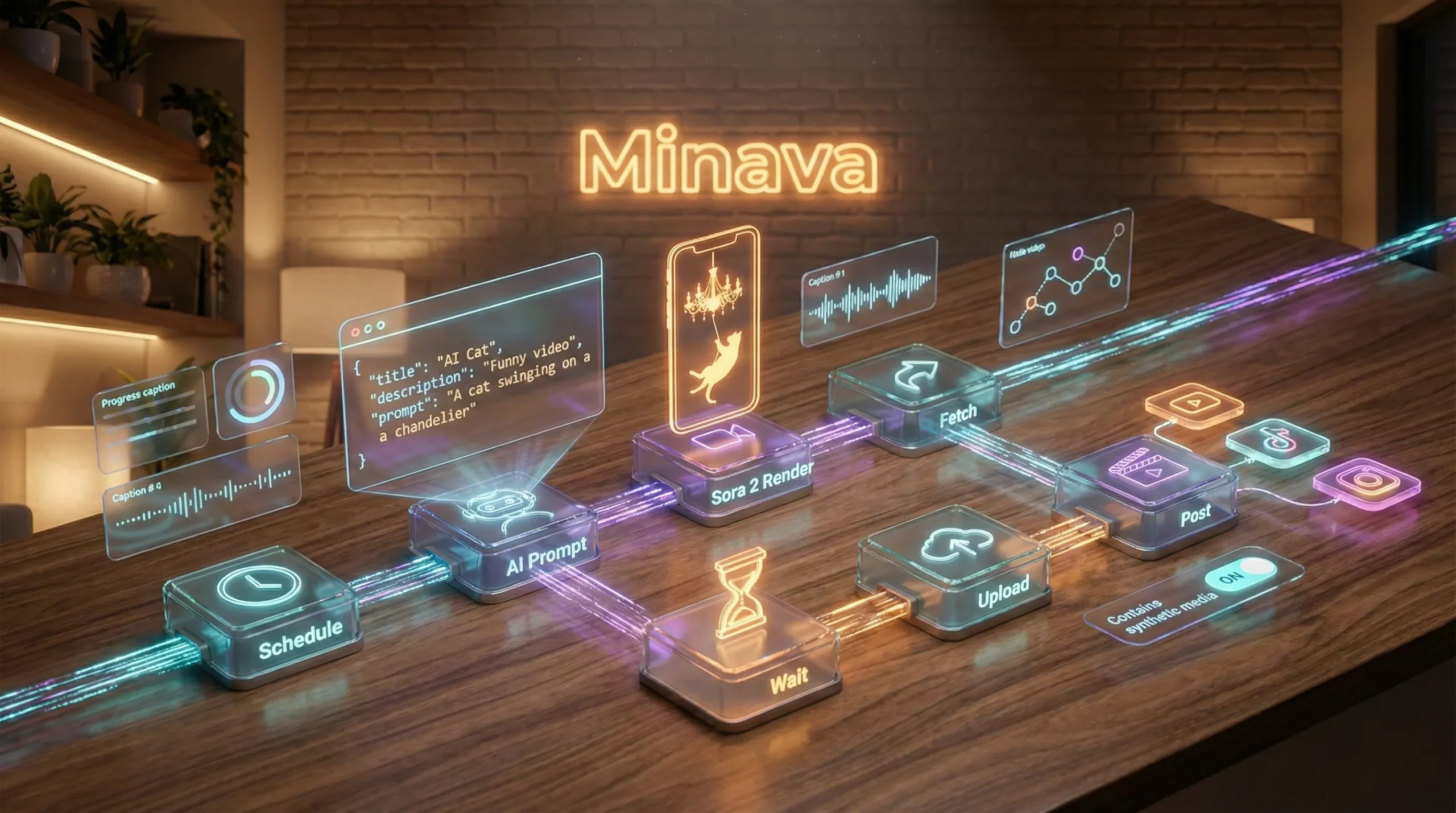
Step‑By‑Step: Building Your Own Sora 2 YouTube Automation Workflow
1. Schedule Your Automatic Posting
The first piece of the sora 2 youtube automation workflow is a schedule. You decide how often you want your AI video machine to fire.
- Use a Schedule node in n8n
- Set it to run every 12 hours (or more often if you can afford the credits)
- Each trigger = one new Short created and posted on autopilot
Think about it: even just 2 posts a day equals ~60 AI‑generated Shorts a month. With a decent sora 2 ai viral video system, it only takes a few hits to change your channel’s growth curve completely.
2. Generate Random Viral Story Types
To keep your sora 2 short video automation from repeating itself, you need randomness. The creator in the video uses a simple JavaScript Code node to generate a random number (1–7).
Each number represents a different “viral archetype,” like:
- 1 – Cat snitching on dog
- 2 – Baby almost falling but dog saves it
- 3 – Raccoon running into chaos
- 4 – Cat on chandelier about to crash dinner
- …up to 7 total types
This randomness keeps your sora 2 youtube automation workflow from getting stale, while still staying inside viral‑friendly concepts.
3. Train an AI Agent to Write the Script & Prompt
Now the fun part: the “brain” of your sora 2 ai viral video system. Inside your workflow:
- Add an AI Agent node
- Connect it to Anthropic Claude (for example, Claude 3.5 Sonnet)
- Feed it a system prompt that:
- Explains your seven video types
- Maps each type to a number (1–7)
- Asks for JSON output with:
title,description,prompt
Your user prompt might be something like: “Generate a video idea for number {{randomNumber}}.” Because the agent has been trained on your numbered story list, it knows exactly which scenario to build.
To keep the sora 2 youtube automation workflow reliable, you also use a structured output parser so the AI’s answer is always clean JSON, not a messy paragraph. That makes it easy to plug the title, description, and prompt into later steps without breaking stuff.
4. Send the Prompt to Sora 2 via Key.AI
Once you’ve got a prompt like “Ultra realistic 9:16 video of a cat on a chandelier above a fancy dinner table, dramatic lighting, handheld phone footage style,” it’s time for the visual generator to do its job.
Here’s how that piece of the sora 2 short video automation works:
- Add an HTTP Request node in n8n
- Use the Key.AI Sora 2 API “create task” endpoint
- Paste in the
curlexample from their docs and import it into your node - Turn off manual headers and instead:
- Add “Authorization: Bearer <your_api_key>” using their Key.AI API key
- Set
aspect_ratioto"portrait"for vertical Shorts - Inject the AI agent’s prompt field into the JSON body
Each run costs around $0.15 per video (depending on your provider’s pricing), so factor that into your budget. But if one of these Sora‑generated clips hits hard, that cost gets paid back quickly via ad revenue, affiliate links, or product sales.
5. Wait for Sora 2 to Finish and Retrieve the Video
The sora 2 youtube automation workflow isn’t instant—Sora needs some time to render the video. That’s where the Wait node and a second HTTP Request come in:
- Wait Node:
- Set a delay (usually 150–400 seconds)
- You can start with 400 seconds to be safe
- Get Task Node:
- Uses the Task ID from the “create task” response
- Calls the “get task” or “query task” endpoint on Key.AI’s Sora 2 API
- Extracts the final video URL from the JSON
Once this step is stable, your sora 2 ai viral video system always ends up with a clean direct URL to the generated MP4 file. That URL is the bridge between “AI dream” and “actual viral Short on your channel.”
6. Send Your Video to a Posting Tool (Blott or Similar)
Now your sora 2 short video automation just has to upload the file to your accounts. Instead of building your own API integration for YouTube, TikTok, or Instagram, it’s easier to use a tool like Blott that handles the platform side.
Typical steps:
- Inside Blott, connect your YouTube, Instagram, and/or TikTok accounts by logging in
- In your workflow, add a Blott – Upload Media node
- Pass in the Sora video URL extracted from the previous HTTP node
- Blott returns its own internal media URL/ID
At this point, your sora 2 youtube automation workflow has fully handled the creative and technical heavy lifting. All that’s left is to hit “post.”
7. Auto‑Post to YouTube Shorts (and Other Platforms)
Here’s where everything comes together. You add one final Blott – Create Post node and set it up like this:
- Platform: YouTube (for Shorts), or TikTok, or Instagram Reels
- Account: Select the channel you connected in Blott
- Title: AI agent’s JSON
title(e.g., “Cat Crashes Chandelier Into Dinner”) - Description: AI agent’s JSON
description(add hashtags, CTAs, etc.) - Media URL: Use the Blott media URL from the previous node
- Contains synthetic media: Turn this on to stay compliant with YouTube policies
And just like that, your sora 2 youtube automation workflow is now a fully functional “idea‑to‑upload” machine. No editing. No filming. All automated.
Costs, Monetization & Realistic Expectations
Let’s be real for a second. A sora 2 ai viral video system is insanely powerful, but it’s not “free money.” There are costs and limits, and you still need strategy.
Typical Cost Breakdown
- Workflow builder (like n8n cloud or NAND‑style platform): ~$29/month
- Claude / Anthropic API: usually a few cents per workflow run
- Sora 2 via Key.AI: ≈ $0.15 per video (watermark‑free, vertical)
- Blott or similar posting tool: around $29/month for multiple accounts
Your actual monthly spend depends on:
- How many videos you generate per day
- Which models you use (Claude variants, etc.)
- How many platforms you post to
If your sora 2 short video automation consistently hits decent views, the system can pay for itself through:
- YouTube Ad Revenue (once you’re monetized)
- Affiliate links in your descriptions
- Digital products (courses, presets, guides)
- Brand deals once you have audience and proof
Best Practices for Making Sora 2 Shorts Actually Go Viral
Having a sora 2 youtube automation workflow is cool, but making it viral‑ready is a whole different game. Here are some battle‑tested tips:
1. Obsess Over the First 2 Seconds
Your viewer is scrolling like crazy. If the first frames aren’t interesting, you’re done. When you craft your prompts for the sora 2 ai viral video system, force Sora to open with tension or curiosity:
- “A cat frozen in mid‑jump on a chandelier above a fancy dinner table.”
- “A baby leaning off a sofa edge while a dog looks up in slow motion.”
- “A raccoon sprinting straight towards the camera through a fancy living room.”
2. Use Human‑Sounding Captions & VO
Even if you’re not recording your own voice yet, your sora 2 short video automation should generate human, casual‑feeling descriptions and dialog. Avoid robotic text like “This is a dog saving a baby”. Go for:
- “Really? Are you serious right now?”
- “Look at me, buddy. Is that true?”
These types of lines make your videos feel more like authentic clips, not AI experiments.
3. Test Multiple Archetypes
The original creator didn’t just rely on one story idea. They tested at least seven. That’s the smart way to train your sora 2 youtube automation workflow for long‑term performance. Over time, you’ll see patterns:
- Maybe “cat snitching on dog” consistently hits harder than “raccoon running in”
- Maybe “baby + dog save” formats pull higher retention
Once you see winners, double down and create new variations within your sora 2 ai viral video system prompt library.
Want to Go Deeper With AI Automation?
If this whole sora 2 short video automation setup got you excited, you’ll love taking your automation skills further. Here are some solid next reads:
- How to Build a Telegram Bot with ChatGPT — turn your channel into a chatbot‑powered community.
- n8n + OpenAI Integration Guide — learn how to combine workflows and AI step‑by‑step.
- Self‑Host Your Own n8n AI Agent — for when you want full control, privacy, and scalability.
Summary: Is the Sora 2 YouTube Automation Workflow Worth Building?
The sora 2 youtube automation workflow is basically the next level of “faceless automation” channels. Instead of stock footage + text, you get cinematic, customized, AI‑generated reality.
When done right, a strong sora 2 ai viral video system gives you:
- Hands‑off video creation after initial setup
- Consistent posting schedules without burnout
- Room to experiment with multiple viral concepts at once
- Real potential for monetization via Shorts, links, and products
It’s not magic. You’ll still tweak prompts, fix errors, and tune your sora 2 short video automation over time. But for young creators and side‑hustlers who want leverage instead of hustle‑grind culture, this is one of the most powerful stacks you can build right now.
If you found this breakdown useful, share it with a friend who’s into AI or YouTube, and drop a comment with what part of the sora 2 youtube automation workflow you want to try first. And when you’re ready to go even deeper into automation, don’t forget to check out the other AI guides on Minava.
FAQ: Sora 2 YouTube Automation Workflow
1. What is a Sora 2 YouTube automation workflow in simple terms?
A sora 2 youtube automation workflow is a connected set of tools that automatically generates short videos with Sora 2, writes titles and descriptions using AI, and then posts those videos to platforms like YouTube Shorts without you manually editing or uploading anything.
2. Can I really get viral videos with a Sora 2 AI viral video system?
Yes, it’s possible. The creator in the reference video showed examples with 122M+ views. But “viral” isn’t guaranteed. A sora 2 ai viral video system gives you speed and volume; you still need strong concepts, hooks, and thumbnails to consistently blow up.
3. How much does it cost to run a Sora 2 short video automation setup?
Costs vary, but expect roughly $0.15 per video for Sora 2 via Key.AI, plus a few cents for AI text generation and around $29/month each for your workflow builder and posting tool. The more videos your sora 2 short video automation generates daily, the higher your total spend.
4. Do I need to know how to code to build this workflow?
Not really. Most of the sora 2 youtube automation workflow is drag‑and‑drop using visual tools like n8n. You might paste in small code snippets (like a random number generator), but you can grab those from AI or tutorials without being a developer.
5. Is it allowed to upload Sora 2 AI videos to YouTube and TikTok?
Yes, but you must follow each platform’s rules. For example, YouTube requires you to mark content as “containing synthetic media” when relevant. When setting up your sora 2 ai viral video system, always enable disclosure options in your posting tool and stay updated with policy changes on YouTube Help and similar official resources.