Welcome to your weekly dose of AI news from Minava.org! Let’s be real, the world of generative AI is moving at lightning speed. One week you’re mastering a tool, and the next, it has a brand-new feature that completely changes the game. This week’s AI tools features update is packed with exactly that: updates that make you wonder if manual, tedious work is on its way out for good. We’re diving into some truly mind-blowing new capabilities that either automate impossible tasks or make everyday ones incredibly efficient. This isn’t just another tech report; it’s a look at the future of how we create, learn, and work.
From Google’s new app builder that requires zero code to Photoshop basically doing a graphic designer’s most common task with one click, this generative AI weekly digest is one you won’t want to miss. Ready to see what’s new?
Google’s Opal: Build Your Own AI App, No Coding Required
First up, and probably the most unexpected release of the week, is Opal by Google. We’ve seen plenty of AI app builders, but Opal does something different. It perfectly blends a super user-friendly interface with a customizable workflow, creating a unique middle ground between no-code automation tools and more complex platforms.
So, how does it work? Imagine you want to build a tool that analyzes a business’s website. With Opal, you can:
- Step 1: Set up an input field for a URL.
- Step 2: Add a step that uses Gemini AI to research that URL.
- Step 3: Add another step to summarize the findings.
The magic is that you can see the app working in real-time on the side of your screen and easily “remix” it by adding more steps or customizing the prompts. This is a fantastic example of a practical AI application update that empowers anyone to build their own tools. It hints at a future where creating custom AI solutions is as easy as making a playlist. Thinking about creating your own automated systems? This could be a great starting point for your next AI agent business idea.
Photoshop Harmonize: The One-Click Wonder for Designers

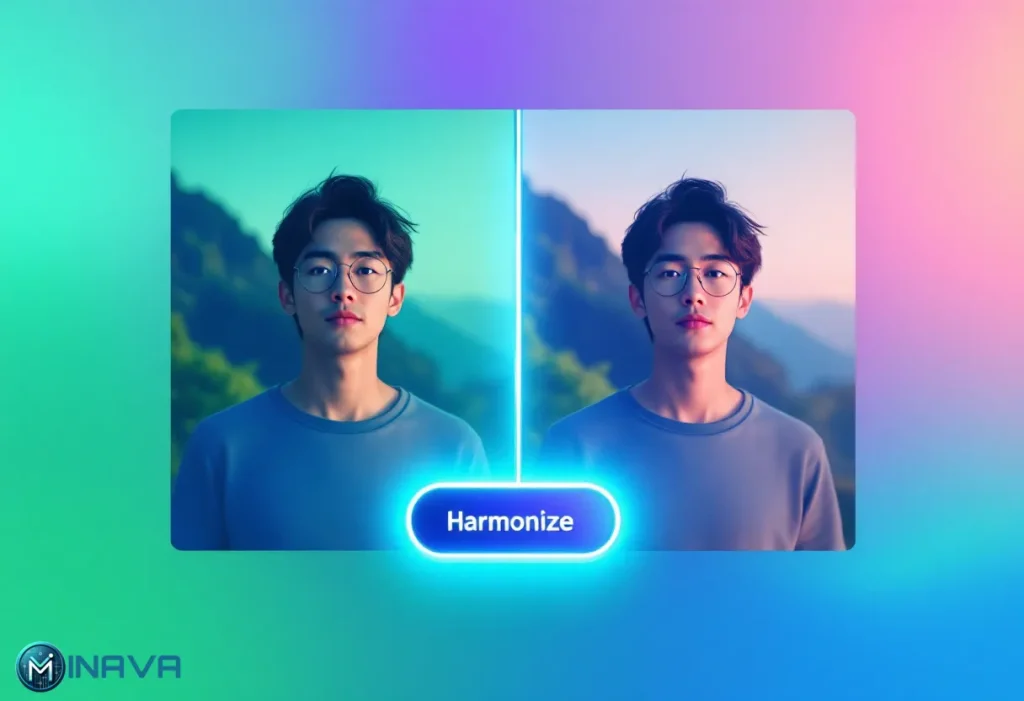
Okay, prepare to have your mind blown. Adobe just dropped a feature in the Photoshop beta called Harmonize, and it‘s a real game-changer. Anyone who‘s ever tried to blend two different images together knows the pain. You spend hours adjusting colors, lighting, and shadows to make it look natural. It‘s a manual, laborious process.
What if you could do all of this with a single click? That’s what Harmonize does. You place a new object in a photo, and with one click, it instantly:
Matches the environmental color tones.
Adjusts the lighting to fit the scene.
Even adds realistic shadows and adjusts textures!
The presenter of the video said this would have saved him hundreds of hours. This is a massive AI tools features update that solves one of the most time-consuming tasks in graphic design, enabling creatives to consider the larger picture. Is it the demise of manual photo editing? Possibly not, but it’s a giant step in the right direction.
What‘s New in This Practical AI Applications Update? More Creative & Learning Tools!
The creativity doesn’t stop at building and editing. Some fantastic learning and content creation updates came through this week to make complex information more accessible than ever.
NotebookLM Turns Your Notes into a Video Presentation
If you’re a visual learner, you’ll love this. Google’s NotebookLM, an app designed to help you work with your documents, just added “Video Overview.” You feed it your notes, research papers, or any documents, and it generates a full-on PowerPoint-style video presentation, complete with slides and a surprisingly human-like voiceover.
Just think about the possibilities! Instead of just reading summaries, you can now watch a personalized video that teaches you the content. It’s a powerful step towards on-demand, personalized education. This kind of tech is a dream for anyone looking into automated content creation with AI.
ChatGPT Wants to Be Your Personal Tutor
Even ChatGPT is getting in on the targeted features. A new “Study and Learn” mode for paid users changes how the AI interacts with you. Instead of just giving you the answers, it guides you. If you ask it a question and then ask for the answer, it will gently push back, saying something like, “Let’s slow down so you learn the ‘why,’ not just the ‘what.'” It’s designed to be a Socratic learning partner, asking you follow-up questions and quizzing you to ensure you actually understand the topic. A small but significant update for students everywhere.
The Big Question: So, What’s Up with GPT-5?
Amid all these concrete updates, there’s the lingering anticipation for the next big thing: GPT-5. Everyone was expecting it in July, but now we’re still waiting. So, what do we know?
- It’s coming “soon”, according to OpenAI’s CEO Sam Altman.
- It’s expected to be much more capable, nailing questions that current models struggle with.
- The speculation: Many believe it won’t just be a smarter model, but a truly integrated one. Imagine an AI that automatically knows whether to search the web, generate an image, analyze a document, or even edit a video for your request, without you having to select a specific mode.
The hype is real, and the moment it drops, it could represent the most significant AI tools features update we’ve ever seen. While we wait, you can read more about what the future holds with our deep dive into GPT-5 and the dawn of superintelligence.
Final Thoughts: Embracing the Automation Wave
So is manual labor done? Not exactly, but the path is laid out. This week’s new crop of AI features and tools points clearly in one direction: automating repetitive, time-consuming tasks across a range of domains—everything from coding and design to learning and research. Packages such as Opal, Photoshop’s Harmonize, and NotebookLM’s Video Overview are not toys; they are strong helpers that do the heavy lifting so humans can do strategy, creativity, and the large ideas. It is a thrilling time to be alive and learning about these programs!
What do you think of these updates? Is there a particular feature you’re particularly excited about? Let us know in comments below, and don’t forget to share this article with your friend who‘s gotta stay current on the cutting-edge in AI!
Frequently Asked Questions (FAQ)
1. What are the most significant recent AI tool updates?
Some of the most impactful recent updates include Google’s Opal for no-code AI app creation, Adobe Photoshop’s “Harmonize” feature for one-click image compositing, and Google NotebookLM’s “Video Overview” for turning documents into video presentations.
2. Will AI tools like Photoshop Harmonize replace graphic designers?
It’s unlikely to replace them. Instead, it will act as a powerful assistant. These tools automate tedious and time-consuming parts of the job (like color matching), freeing up designers to spend more time on creative conceptualization, strategy, and overall composition, thereby enhancing their productivity.
3. How can I start using these new AI features?
Most of these features are being rolled out to existing platforms. You can try Opal by visiting its website (you may need a VPN for US access). The Harmonize feature is available in the Photoshop Beta for Creative Cloud subscribers. The “Study and Learn” mode is available to paid ChatGPT users.
4. Are AI updates mainly focused on text and images?
While text and images are major areas, we’re seeing a rapid expansion into other modalities. The NotebookLM update, which creates video from documents, and the constant progress in AI-powered audio and video editing show that AI is becoming a multi-modal creative partner, impacting nearly every digital medium.